
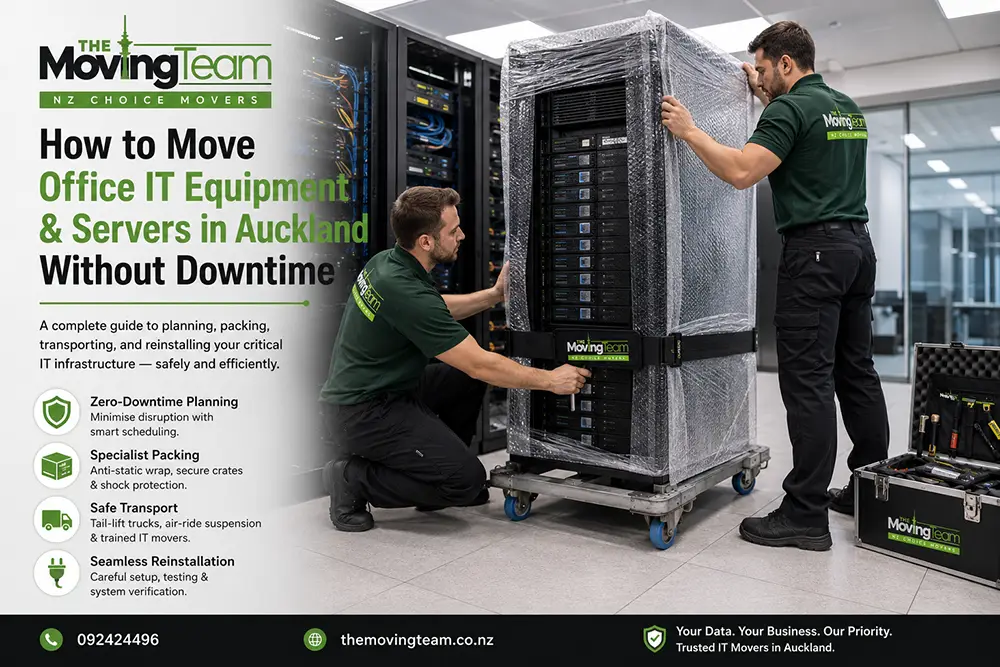
For any modern business, the server room is the beating heart of operations. When executing a corporate relocation, standard office furniture is easy to replace if damaged, but your company’s data, hardware, and network infrastructure are irreplaceable. The primary concern for CEOs and IT managers is not just the physical transport, but the sheer cost of operational downtime. Successfully moving office IT equipment Auckland wide requires military-level precision, anti-static packing materials, and a flawless execution schedule. In this expert B2B guide, we will outline the ultimate zero-downtime strategy to safely relocate your servers, workstations, and telecommunication systems so your team can plug in and get back to work immediately on Monday morning.
The Zero-Downtime Strategy: A Phased Approach
Achieving strictly zero downtime means your business must remain functional while the move happens. This is typically achieved through a “Phased IT Relocation.”
1️⃣ The Pre-Move Audit
Weeks before moving day, your IT department and our commercial movers will map out the new floor plan, label every single cable, and determine exactly where each workstation belongs.
2️⃣ Friday Night Shutdown
To prevent business interruption, the physical move of servers and core infrastructure occurs after standard business hours, usually on a Friday evening, ensuring a full weekend for setup.
3️⃣ The “Leapfrog” Method
For businesses operating 24/7, we move non-essential workstations first. Essential teams keep working at the old site until the new site’s network is live, seamlessly leaping over without dropping a call.
Hardware Packing Protocols: Beyond Standard Cardboard
You cannot pack a $20,000 corporate server the same way you pack a kitchen blender. Commercial IT hardware requires highly specialized handling.
| Equipment Type | Specialized Packing Method | Why It Matters |
|---|---|---|
| Server Racks & UPS | Anti-static bubble wrap, specialized server lifters, and air-ride suspension trucks. | Prevents electrostatic discharge (ESD) which can instantly wipe data or destroy motherboards. |
| Dual Monitor Workstations | Hard plastic rolling crates (Computer Crates) with padded dividers. | Cardboard can crush under pressure. Plastic crates provide rigid protection for fragile LCD/OLED screens. |
| Cables & Peripherals | Zip-tied, color-coded, and bagged individually per workstation. | Saves the IT team hundreds of hours during the reconnection phase at the new office. |
Data Security During Transit
Physical damage is not the only risk; data security is paramount. When moving unencrypted drives or sensitive client files, chain-of-custody must be maintained. We recommend that companies always run a full cloud backup before the physical servers are disconnected. For guidelines on business data protection and cyber resilience during transitional periods, we advise IT managers to review the official recommendations by CERT NZ (Cyber Emergency Response Team) to ensure your data is secure both physically and digitally.
FAQs: Expert Advice for Commercial IT Relocation NZ
1. Can your team safely move a fully loaded server rack?
Yes. However, depending on the weight and the building’s elevator capacity, our commercial movers often recommend removing the heaviest servers (like the UPS batteries) from the rack, moving them individually, and re-racking them at the destination to prevent structural damage.
2. Do you help disconnect and reconnect the computers?
Our expert office moving team handles the physical packing and transportation. The logical disconnection (shutting down servers) and reconnection to the new network should always be managed by your company’s internal IT department or MSP.
3. What happens if an elevator breaks down during our office move?
This is why we conduct a pre-move site audit. We always identify secondary service elevators or secure stairwell access to ensure the move continues without severe delays.
4. Are your movers trained in handling fragile electronics?
Absolutely. We provide a specialized corporate packing service where our staff are specifically trained to use anti-static materials and handle high-value screens and server units with utmost care.
5. How do we ensure cables don’t get mixed up?
We use a strict color-coding and labeling matrix. Every monitor, keyboard, and cable is bagged together and tagged with a specific desk number that matches the new office floor plan.
6. Is it safe to move our office photocopier?
Large commercial photocopiers require careful handling and must remain completely upright to prevent ink spills or laser misalignment. If it is exceptionally large, our heavy equipment transport techniques are utilized to move it safely.
7. Can you execute the move over the weekend?
Yes. In fact, 90% of our Auckland corporate relocations happen between Friday evening and Sunday afternoon to guarantee your staff experience zero downtime during the workweek.
8. Do you provide the plastic computer crates?
Yes, we can supply specialized hard-plastic IT crates prior to the move. These are far superior to cardboard boxes for transporting sensitive keyboards, mice, and monitors.
9. Are my company’s servers insured during the drive?
While we take every precaution, we highly recommend your company contacts its commercial insurance provider to ensure your policy covers “Goods in Transit.”
10. How far in advance should a business plan an IT relocation?
For a smooth, zero-downtime transition, IT managers and business owners should start consulting with their moving company at least 6 to 8 weeks before the lease handover date.
Secure Your Company’s Data & Avoid Costly Downtime
Don’t leave your critical IT infrastructure in the hands of amateurs. Partner with Auckland’s premier commercial movers to ensure a secure, seamless, and completely stress-free office relocation.
Request a Corporate Moving Audit
- Expert Furniture Movers
- End of Tenancy Cleaning
- 100% Reliable & Fully Insured
